Built for UK building surveyors and construction professionals

What if you never spent another
evening writing up a site visit?

Back from site, log your defects and photos. Run Analysis. Reflect, refine, and issue a client-ready inspection report and schedule of works the same day.

7 days free - No card required - Most users produce their first report on day one

7-day free trial · No card required
Word reports ready to send to clients
CDM-compliant schedules, export-ready
Repair scope from your site notes
Photo-assisted defect analysis included

What BuildStack produces

Everything your client needs. One workflow.

Every deliverable exported from the same logged data. Review, finalise in Word, and issue directly to clients or contractors.

01 · Defect log

Every issue logged and organised back at your desk - severity, status, location, trade, photos. Nothing to reconstruct later. Filterable across the whole project at any time.

02 · Repair guidance

Professionally worded probable cause and repair scope, generated from your site notes in seconds. Saves the time you'd spend writing repair scope from scratch - edit freely before issuing.

03 · Inspection report

A complete, formatted Word document - all defects, descriptions, photos, and repair recommendations. Ready to issue to clients directly from BuildStack. No template rebuilding required.

04 · Schedule of works

A sequenced, itemised schedule of works with CDM notes built in - sorted by severity. Issue unpriced for contractor tendering, or add prices for a budget estimate. Export to Word or Excel.

Try it free - use it on a real project

7 days free · No card required · Most users produce their first report on day one

Repair guidance

BuildStack Analysis built on UK building pathology

Add your site observation and photos. BuildStack identifies the materials present, considers differential diagnoses, and generates a probable cause and NBS-style repair scope - contextual to your specific defect, not a generic template. You review, edit, and approve before anything reaches the client.

BuildStack works from your notes, not generic templates. Your professional judgement stays in control throughout.

Photo defect analysis

Attach a photo. Get BuildStack-assisted analysis.

Upload site photos directly against each logged defect. BuildStack uses the photo evidence alongside your notes to generate BuildStack-assisted probable cause and repair guidance. You review, edit, and approve - nothing reaches the client without your sign-off.

Real defect photo - from a live BuildStack inspection
Water ingress to front entrance door3 photos attached
Defect photo: water staining to internal reveal and skirting at low level - ground floor front entrance door
All photos:
Interior reveal and skirting - water staining at low level
Exterior door threshold - DPC gap at cill bearing
Exterior front entrance door - overview
14 Elm Road, Silverstone · 2026

Attach photos from your site visit to each defect. They appear in your inspection report and schedule of works automatically - no re-captioning, no file transfers.

BuildStack-assisted analysis - generated from photo + site notes

BuildStack draws on the attached photos and your site notes to generate contextual guidance - not generic templates. Fully editable before saving to the defect record.

Photos are embedded directly into your inspection report. Every photo you attach appears alongside the relevant defect entry in the exported Word document - no re-captioning, no copying files between tools, no manual insertion.

The problem

Still losing hours to admin after every site visit?

Most property professionals are doing this job twice. Once on site. Once back at the desk. BuildStack fixes the second half.

The old way
  • Site notes on your phone, defect photos in WhatsApp, repair scope in a Word draft - all disconnected
  • Rebuilding the same report template from scratch on every single instruction
  • Spending your evening writing up a site visit you finished at lunchtime
  • AI tools that give generic advice that could apply to any building anywhere
  • Reports that look different every time - because they depend on who is doing the typing
With BuildStack
  • Every defect, photo, and note in one place from the moment you start logging back at your desk
  • Inspection report and schedule of works generated automatically - same data, zero reformatting
  • Back from site, run Analysis, issue a client-ready Word document the same day
  • BuildStack identifies materials from your photos, applies differential diagnosis, and writes to UK specification standard
  • Consistent, professionally worded deliverables on every instruction - regardless of who runs the project

There is a better way.

BuildStack gives you a single workflow - from first site note to issued deliverable. Log your defects and photos, run Analysis, review and refine the drafts, then export client-ready Word documents. No template rebuilding, no reformatting, no starting from scratch.

See how it works ->

How it works

Site visit to signed-off deliverable, start to finish

01

Create a project

Set up a project with the property address and client details. Every defect, photo, and note goes into one place from day one - nothing to reconstruct later.

02

Log your site findings

Log each defect with severity, location, and site notes. Attach photos from your camera roll. Back at your desk, everything is already structured and waiting.

03

Run Analysis

Generate probable cause and repair scope for each defect. BuildStack draws on UK building pathology knowledge and your specific site notes - not generic templates.

04

Export and issue

Export to Word or Excel. Review and refine before you issue - BuildStack gives you the time to reflect on your notes and the document before it goes to the client. No template rebuilding, no reformatting.

Built for professionals

Built around your professional judgement

Most inspection apps capture your data and generate a report automatically. BuildStack gives you analysis drafts you review, refine, and issue as your own work. The time between logging and issuing is yours - for reflection, for quality, for professional judgement.

Other apps
Capture
Auto-generate
Issue
BuildStack
Observe
Analysis draft & reflect
Review & refine
Issue

Deliverables

Everything your clients and contractors need

Four professional outputs, all generated from the same logged data. Ready to issue to clients or contractors without any reformatting.

01

Defect Log

Everything logged and organised back at your desk

Log each defect with severity, status, location, trade, and photos. Filter and sort across the project at any time. The single source of truth for everything downstream - and what makes report-writing actually fast.

Photo attachmentsFilterable & searchableStatus tracking
02

Repair Guidance

Repair scope written for you, per defect

Run Analysis on any logged defect to get professionally worded probable cause and recommended remediation - based on your site notes, severity, and location. Saves the time you'd otherwise spend writing repair scope from scratch. Edit, refine, issue.

Contextual analysisProfessional languageFully editable
03

Inspection Report

Professional report, ready to issue

Export a structured inspection report including all defects, descriptions, photos, and generated repair recommendations. Formatted and ready to issue directly to clients - no manual reformatting required.

.docx exportPrint from WordProfessional layout
04

Schedule of Works

Unpriced scope document - ready for tender issue

A sequenced, itemised remediation schedule with CDM compliance notes built in. Issue unpriced for contractor tendering - or add prices for a budget estimate. Export to Word or Excel. No manual assembly required.

.docx & Excel exportCDM compliantSorted by severity

Your deliverables

What your client actually receives

Three distinct documents - all produced from the same logged data. Export to Word, review and finalise, then issue directly to clients or contractors. No template rebuilding, no copy-pasting, no starting from scratch.

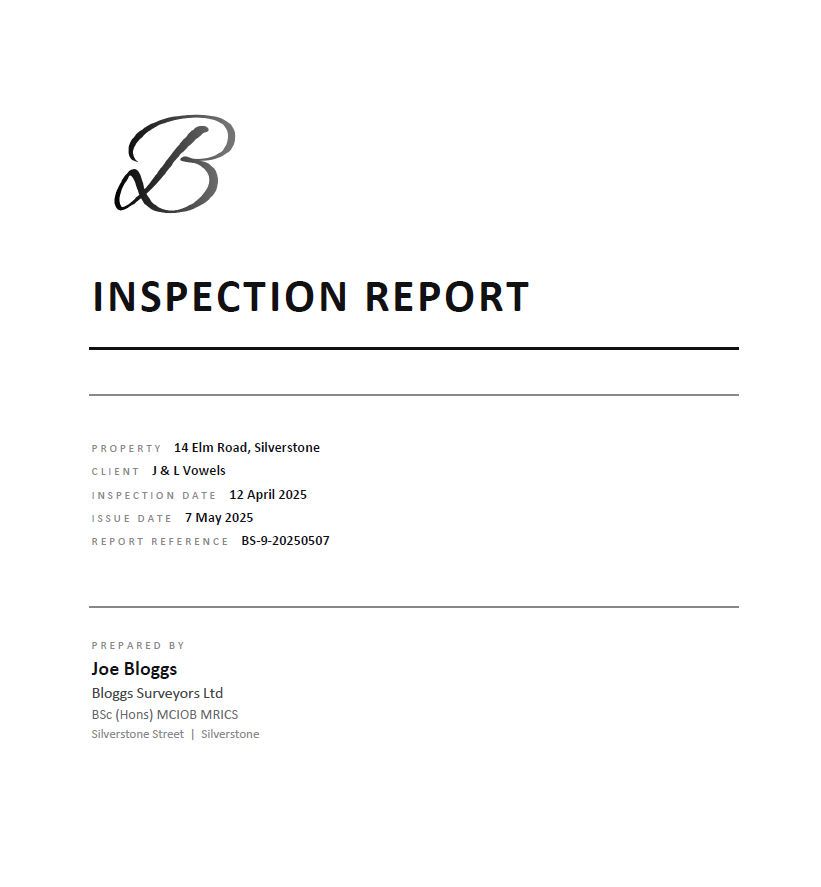
Inspection report cover page showing project details and summary
1 / 3 · Cover page
Try it free - produce your first deliverables today

7 days free · No card required

Who it's for

Built for property professionals who produce the work

Building Surveyors

The core use case. Defect reports, schedules of works, and repair specifications - produced faster, without rebuilding the same documents from scratch on every instruction.

Also built for

Schedule of condition surveyors

Practitioners producing schedules of condition for lease renewals, dilapidations, and acquisition work - where accurate defect records and professional output quality matter most.

Contract administrators

Managing defect liability periods, snagging, and practical completion. BuildStack keeps the defect evidence organised and the schedule of works ready to issue at every stage.

Defect and snagging professionals

Specialists recording and tracking defects across residential and commercial schemes who need a structured, repeatable workflow from first inspection through to sign-off.

What you get

Everything you need to go from site to issued deliverable - in one place

Structured defect logSaves 30-45 min per instruction on desk time

Every issue logged back at your desk with severity, location, trade, photos, and status. Structured from the start - nothing to reformat later.

Probable cause and repair scopeSaves 20-40 min per defect entry

Run Analysis on any logged defect. Get professionally worded guidance based on your site notes and UK building pathology - not a generic template.

Inspection report - Word exportSaves 2-4 hrs per report

All defects, observations, probable causes, recommendations, and photos in a structured, formatted Word document. Ready to review, finalise, and send to the client.

Schedule of works - Word and Excel exportSaves 1-2 hrs per schedule

A sequenced, itemised remediation schedule with CDM compliance notes. Issue unpriced for contractor tendering, or add prices for a budget estimate.

All from the same logged dataNo double-handling

Every output - report, schedule, cost plan - is generated from the same defect record. Log once, produce everything. No re-entering, no reformatting.

The maths: A construction professional saving 2 hours per instruction at £150/hour covers the cost of Solo in under 20 minutes of billable time recovered. Most users save far more than that.

Built on UK building pathology

BuildStack identified MgO board from site photos - without being told what material it was.

Most AI gives you the same answer regardless of what material is in the photo. BuildStack identifies UK-specific materials, applies differential diagnosis, flags regulatory obligations, and writes repair scopes to specification standard.

Defect Analysis - live outputReal output - not edited
MgO board site photo from live inspection
Site photo - uploaded during inspection
Surveyor's site observation

“Water staining to first floor ceiling finishes. Boarding to spandrel panel in roof space appears damp and timbers fixed to boarding are absorbing moisture.”

BuildStack Analysis

Observations suggest the boarding to the spandrel panel is magnesium oxide (MgO) board - identifiable from the photographic evidence by its characteristic beige fibrous texture and regular screw fixing pattern. MgO board is hygroscopic and absorbs atmospheric moisture irrespective of external water ingress. The material cannot be remediated by drying out - full removal and replacement is required. The surveyor should consider whether the condition of the board has compromised its contribution to party wall compartmentation in accordance with Approved Document B.

Draft analysis - professional review required before issuing to client.

The MgO identification, fire stopping flag, and removal recommendation were all generated from the site note alone. No material was specified in the input.

Material identification from photos

Identifies MgO board, cavity tie failure, EIFS defects, and other UK-specific material failures directly from site photographs - without being told what to look for.

NBS-style repair scopes

Repair specifications written with materials named, standards referenced, and trades sequenced in the correct order - ready to issue to a contractor.

Building Regulations compliance flags

Automatically identifies fire stopping, structural stability, party wall, and other regulatory compliance obligations relevant to the defect.

Professional liability protection

All outputs use appropriately hedged professional language - presenting findings as observations for the named surveyor to review and approve.

Every Analysis output is a professional first draft - you review, edit, and approve before anything reaches your client.

Zero risk

Try it on a real job. If it does not save you time, you have lost nothing.

Set up a real project, log your defects, run Analysis, and export a client-ready Word document. If it does not save you time, walk away. It costs you nothing to find out.

Start free trial - no card required
7 days full access
No credit card required
Cancel anytime

Pricing

A workflow that pays for itself on the first job

Try free for 7 days - no card required. Upgrade when you're ready.

2-3 hrs
Typically saved per report on desk time
£150+
Average hourly rate for a chartered surveyor
1 job
Covers a full month of Solo

A construction professional saving 2 hours per instruction at £150/hour covers the cost of Solo in under 20 minutes of billable time recovered.

Free Trial
£0
7 days full access - no card required
  • 1 project
  • Log up to 50 issues per project
  • UK building pathology analysis
  • White-label report branding
  • Report and schedule export
  • No credit card needed
Start free trial
Single Project
£24.99one-off
1 project, permanent access
  • 1 active project
  • Log up to 50 issues per project
  • UK building pathology analysis
  • White-label report branding
  • Inspection report export
  • Schedule of works export
Get started
Most popular
Solo
£39/ month
Up to 5 active projects at any time
  • Up to 5 active projects at any time
  • Archive completed jobs to free slots for new instructions
  • Log up to 100 issues per project
  • UK building pathology analysis
  • White-label report branding
  • All export formats
  • Cancel anytime
Get started
Best value
Professional
£99/ month
Everything in Solo, unlimited projects
  • Unlimited active projects
  • White-label report branding
  • UK building pathology analysis
  • All export formats
  • Priority support
  • Cancel anytime
Get started
Enterprise
Custom
Tailored to your practice
  • Unlimited users and projects
  • White-label report branding
  • Bespoke report template matching your existing format
  • Custom AI tuning for your practice specialism
  • SLA and guaranteed response times
  • Data Processing Agreement available

Contact us for full details

Contact us

No credit card required · Cancel anytime · UK-based support

FAQ

Common questions

How does the free trial work?

You get 7 days of full access with no credit card required. At the end of the trial you can upgrade to a paid plan, or let it lapse - no commitments, no automatic charges.

Can I produce actual Word documents from BuildStack?

Yes. BuildStack exports both inspection reports and schedules of works as formatted .docx files, ready to send to clients or continue editing in Microsoft Word.

How does BuildStack Analysis work?

When you log a defect, you can run BuildStack Analysis to get contextual guidance on likely causes and recommended remediation approaches. BuildStack uses your defect description, severity, and site notes - it is there to support your professional judgement, not replace it.

Who is responsible for the generated content?

You are. BuildStack is an assistant tool - it drafts probable cause and repair guidance based on your site notes. You review, edit, and approve everything before it reaches a client. BuildStack accepts no liability for outputs used without professional review.

Do I need to be RICS-qualified to use BuildStack?

No. BuildStack is designed for any property professional producing defect reports, schedules of works, or inspection documentation. RICS qualification is not required - but the outputs are written to the standard expected of one.

Can I upgrade or cancel at any time?

Yes. Solo and Professional plans are monthly subscriptions with no minimum term. Upgrade, downgrade, or cancel from your billing settings at any time. Single Project is a one-off payment.

Does BuildStack include pricing data or rate libraries?

We're building integrations with pricing data sources - this is coming soon. For now, the priced schedule uses your own rates which you can enter and adjust per item.

You did not qualify to spend your evenings reformatting Word documents.

BuildStack handles the admin. You handle the professional judgement. 7 days free - no card required.